
|
Definition and UsageThe A Browser Support
Global AttributesThe Event AttributesThe |

How to create HTML <tr> Tag
It is A simple HTML table with three rows; one header row and two data rows.
index.html
Example:
HTML
 <table>
  <tr>
    <th>Month</th>
    <th>Savings</th>
  </tr>
  <tr>
    <td>January</td>
    <td>$100</td>
  </tr>
  <tr>
    <td>February</td>
    <td>$80</td>
  </tr>
</table> Output should be:
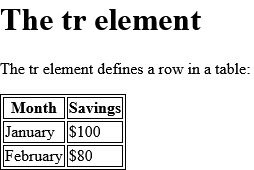
How to align content inside <tr> (with CSS) on HTML <tr> Tag
Right-align content in second table row.
index.html
Example:
HTML
 <table style="width:100%">
  <tr>
    <th>Month</th>
    <th>Savings</th>
  </tr>
  <tr style="text-align:right">
    <td>January</td>
    <td>$100</td>
  </tr>
</table> Output should be:

How to add background-color to a table row (with CSS) on HTML <tr> Tag
Add background color to first table row.
index.html
Example:
HTML
 <table>
  <tr style="background-color:#FF0000">
    <th>Month</th>
    <th>Savings</th>
  </tr>
  <tr>
    <td>January</td>
    <td>$100</td>
  </tr>
</table> Output should be:

How to vertical align content inside <tr> (with CSS) on HTML <tr> Tag
Vertical align content in table rows.
index.html
Example:
HTML
 <table style="height:200px">
  <tr  style="vertical-align:top">
    <th>Month</th>
    <th>Savings</th>
  </tr>
  <tr style="vertical-align:bottom">
    <td>January</td>
    <td>$100</td>
  </tr>
</table> Output should be:

How to create table headers on HTML <tr> Tag
Table Headers
- Horizontal headers
- Vertical headers
index.html
Example:
HTML
 <table>
  <tr>
    <th>Name</th>
    <th>Email</th>
    <th>Phone</th>
  </tr>
  <tr>
    <td>John Doe</td>
    <td>[email protected]</td>
    <td>123-45-678</td>
  </tr>
</table> Output should be:

How to create a table with a caption on HTML <tr> Tag
The caption element.
index.html
Example:
HTML
 <table>
  <caption>Monthly savings</caption>
  <tr>
    <th>Month</th>
    <th>Savings</th>
  </tr>
  <tr>
    <td>January</td>
    <td>$100</td>
  </tr>
  <tr>
    <td>February</td>
    <td>$80</td>
  </tr>
</table> Output should be:

How to define table cells that span more than one row or one column on HTML <tr> Tag
Colspan and rowspan
- Cell that spans two columns.
- Cell that spans two rows.
index.html
Example:
HTML
 <table>
  <tr>
    <th>Name</th>
    <th>Email</th>
    <th colspan="2">Phone</th>
  </tr>
  <tr>
    <td>John Doe</td>
    <td>[email protected]</td>
    <td>123-45-678</td>
    <td>212-00-546</td>
  </tr>
</table> Output should be:

How to set Default CSS Settings on HTML <tr> Tag
Most browsers will display the <tr> element with the following default values.
index.html
Example:
HTML
<style>
tr {
  display: table-row;
  vertical-align: inherit;
  border-color: inherit;
}
</style>
 <table>
  <tr>
    <th>Month</th>
    <th>Savings</th>
  </tr>
  <tr>
    <td>January</td>
    <td>$100</td>
  </tr>
  <tr>
    <td>February</td>
    <td>$80</td>
  </tr>
</table> | html tr |
Type: | Develop |
Category: | Web Tutorial |
Sub Category: | HTML Tag |
Uploaded by: | Admin |
Read Articlehttps://develop.horje.com/learn/1434/reference