
|
Definition and UsageThe Tip: Use the <sup> tag to define superscripted text. Browser Support
Global AttributesThe Event AttributesThe |

How to create HTML <sub> Tag
It subscripts text.
index.html
Example:
HTML
<!DOCTYPE html>
<html>
<body>

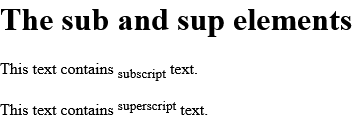
<h1>The sub and sup elements</h1>

<p>This text contains <sub>subscript</sub> text.</p>
<p>This text contains <sup>superscript</sup> text.</p>

</body>
</html>Output should be:
How to set Default CSS Settings in HTML <sub> Tag
Most browsers will display the <sub> element with the following default values.
index.html
Example:
HTML
<!DOCTYPE html>
<html>
<head>
<style>
sub {
  vertical-align: sub;
  font-size: smaller;
}
</style>
</head>
<body>

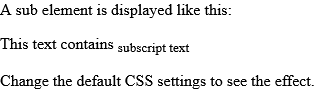
<p>A sub element is displayed like this:</p>

<p>This text contains <sub>subscript text</sub></p>

<p>Change the default CSS settings to see the effect.</p>

</body>
</html>Output should be:
HTML <sub> Tag Video
|
|
| html sub |
Type: | Develop |
Category: | Web Tutorial |
Sub Category: | HTML Tag |
Uploaded by: | Admin |
Read Articlehttps://develop.horje.com/learn/1434/reference