
|
|
HTML <bdi> Tag Isolates a part of text that might be formatted in a different direction from other text outside it. BDI stands for Bi-Directional Isolation. The This element is useful when embedding user-generated content with an unknown text direction. |
How to create HTML <bdi> Tag
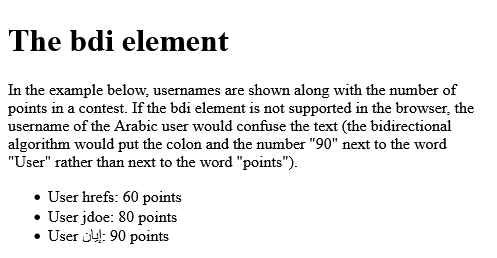
Isolate the usernames from the surrounding text-direction settings:
index.html
Example:
HTML
 <ul>
  <li>User <bdi>hrefs</bdi>: 60 points</li>
  <li>User <bdi>jdoe</bdi>: 80 points</li>
  <li>User <bdi>إيان</bdi>: 90 points</li>
</ul> Output should be:
What Type of Browsers will Support for HTML <bdi> Tag

Category: | Web Tutorial |
Sub Category: | HTML Tag |
Uploaded by: | Admin |
Read Articlehttps://develop.horje.com/learn/1434/reference