
|
|
The Tip: This tag is not deprecated. However, it is possible to achieve richer effect by using CSS (see example below). Also look at:
|
How to create HTML <code> Tag
Define some text as computer code in a document
index.html
 <p>The HTML <code>button</code> tag defines a clickable button.</p>

<p>The CSS <code>background-color</code> property defines the background color of an element.</p> Output should be:
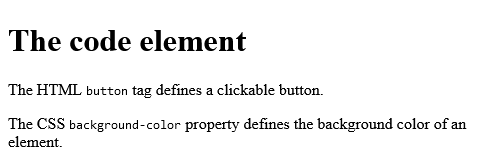
What Type of Browsers will Support for HTML <code> Tag

How to Use CSS to style the <code> element
Follow the Example.
index.html
<style>
code {
  font-family: Consolas,"courier new";
  color: crimson;
  background-color: #f1f1f1;
  padding: 2px;
  font-size: 105%;
}
</style>

<p>The HTML <code>button</code> tag defines a clickable button.</p>
<p>The CSS <code>background-color</code> property defines the background color of an element.</p>Output should be:

How to set Default CSS Settings for HTML <code> Tag
Most browsers will display the <code> element with the following default values:
index.html
<style>
code {
  font-family: monospace;
}
</style>Output should be:

How to add HTML <samp> Tag for Coding view
Define some text as sample output from a computer program in a document:
Definition and Usage
The <samp> tag is used to define sample output from a computer program. The content inside is displayed in the browser's default monospace font.
Tip: This tag is not deprecated. However, it is possible to achieve richer effect by using CSS.
Also look at:
| Tag | Description |
|---|---|
| <code> | Defines a piece of computer code |
| <kbd> | Defines keyboard input |
| <var> | Defines a variable |
| <pre> | Defines preformatted text |
Browser Support

index.html
<p>Message from my computer:</p>
<p><samp>File not found.<br>Press F1 to continue</samp></p>Output should be:

How to set Default CSS Settings HTML <samp> Tag for Coding view
Most browsers will display the <samp> element with the following default values:
index.html
<!DOCTYPE html>
<html>
<head>
<style>
samp {
  font-family: monospace;
}
</style>
</head>
<body>

<p>A samp element is displayed like this:</p>

<samp>Sample output from a computer program</samp>

<p>Change the default CSS settings to see the effect.</p>

</body>
</html>Output should be:

How to add HTML <kbd> Tag for Coding view
Define some text as keyboard input in a document.
More "Try it Yourself" examples below.
Definition and Usage
The <kbd> tag is used to define keyboard input. The content inside is displayed in the browser's default monospace font.
Tip: This tag is not deprecated. However, it is possible to achieve richer effect by using CSS (see example below).
Also look at:
| Tag | Description |
|---|---|
| <code> | Defines a piece of computer code |
| <samp> | Defines sample output from a computer program |
| <var> | Defines a variable |
| <pre> | Defines preformatted text |
Browser Support

index.html
<!DOCTYPE html>
<html>
<body>

<h1>The kbd element</h1>

<p>Press <kbd>Ctrl</kbd> + <kbd>C</kbd> to copy text (Windows).</p>

<p>Press <kbd>Cmd</kbd> + <kbd>C</kbd> to copy text (Mac OS).</p>

</body>
</html>Output should be:

How to add HTML <var> Tag for coding view
Define some text as variables in a document:
Definition and Usage
The <var> tag is used to defines a variable in programming or in a mathematical expression. The content inside is typically displayed in italic.
Tip: This tag is not deprecated. However, it is possible to achieve richer effect by using CSS.
Also look at:
| Tag | Description |
|---|---|
| <code> | Defines a piece of computer code |
| <samp> | Defines sample output from a computer program |
| <kbd> | Defines keyboard input |
| <pre> | Defines preformatted text |
Browser Support

index.html
<!DOCTYPE html>
<html>
<body>

<h1>The var element</h1>

<p>The area of a triangle is: 1/2 x <var>b</var> x <var>h</var>, where <var>b</var> is the base, and <var>h</var> is the vertical height.</p>

</body>
</html>Output should be:

How to set Default CSS Settings HTML <var> Tag for coding view
Most browsers will display the <var> element with the following default values.
index.html
<!DOCTYPE html>
<html>
<head>
<style>
var {
  font-style: italic;
}
</style>
</head>
<body>

<p>A var element is displayed like this:</p>

<var>Variable</var>

<p>Change the default CSS settings to see the effect.</p>

</body>
</html>Output should be:

How to add HTML <pre> Tag
Preformatted text.
Definition and Usage
The <pre> tag defines preformatted text.
Text in a <pre> element is displayed in a fixed-width font, and the text preserves both spaces and line breaks. The text will be displayed exactly as written in the HTML source code.
Also look at:
| Tag | Description |
|---|---|
| <code> | Defines a piece of computer code |
| <samp> | Defines sample output from a computer program |
| <kbd> | Defines keyboard input |
| <var> | Defines a variable |
Browser Support

index.html
<!DOCTYPE html>
<html>
<body>

<h1>The pre element</h1>

<pre>
Text in a pre element
is displayed in a fixed-width
font, and it preserves
both      spaces and
line breaks
</pre>

</body>
</html>Output should be:

How to create a pre-formatted text with a fixed width (with CSS)
Follow the Example.
index.html
 <div style="width:200px;overflow:auto">
<pre>This is a pre with a fixed width. It will use as much space as specified.</pre>
</div> Output should be:

How to add Default CSS Settings HTML <pre> Tag for coing view
Most browsers will display the <pre> element with the following default values.
index.html
<!DOCTYPE html>
<html>
<head>
<style>
pre {
  display: block;
  font-family: monospace;
  white-space: pre;
  margin: 1em 0;
}
</style>
</head>
<body>

<p>A pre element is displayed like this:</p>

<pre>
Text in a pre element
is displayed in a fixed-width
font, and it preserves
both      spaces and
line breaks
</pre>

<p>Change the default CSS settings to see the effect.</p>

</body>
</html>Output should be:

Category: | Web Tutorial |
Sub Category: | HTML Tag |
Uploaded by: | Admin |
Read Articlehttps://develop.horje.com/learn/1434/reference