.png)
|
Definition and UsageThe When present, it specifies that audio/video controls should be displayed. Controls should include:
Applies toThe
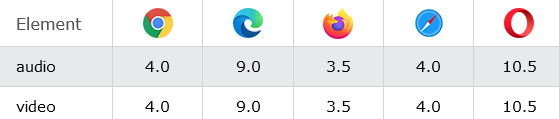
Browser SupportThe
|
How to add An <audio> element with browser default controls
The audio controls attribute. Click on the play button to play a sound.
index.html
Example:
HTML
<!DOCTYPE html>
<html>
<body>

<h1>The audio controls attribute</h1>

<p>Click on the play button to play a sound:</p>

<audio controls>
  <source src="https://freetestdata.com/wp-content/uploads/2021/09/Free_Test_Data_100KB_MP3.mp3" type="audio/ogg">
  <source src="https://freetestdata.com/wp-content/uploads/2021/09/Free_Test_Data_100KB_MP3.mp3" type="audio/mpeg">
  Your browser does not support the audio element.
</audio>

</body>
</html>
How to add A <video> element with browser default controls
The video controls attribute.
index.html
Example:
HTML
<!DOCTYPE html>
<html>
<body>

<h1>The video controls attribute</h1>

<video width="320" height="240" controls>
  <source src="https://www.sample-videos.com/video321/mp4/240/big_buck_bunny_240p_1mb.mp4" type="video/mp4">
  <source src="https://www.sample-videos.com/video321/mp4/240/big_buck_bunny_240p_1mb.mp4" type="video/ogg">
  Your browser does not support the video tag.
</video>

</body>
</html>Output should be:

| html controls attribute |
Type: | Develop |
Category: | Web Tutorial |
Sub Category: | HTML Attribute |
Uploaded by: | Admin |
Read Articlehttps://develop.horje.com/learn/1434/reference