
|
Definition and UsageWhen used by the When used by the The HTML5 specification encourages web developers to use the UTF-8 character set, which covers almost all of the characters and symbols in the world! Applies toThe
Browser SupportThe
|
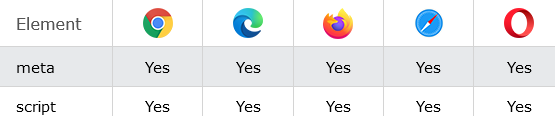
How to Specify the character encoding for the HTML document
See the example.
index.html
Example:
HTML
<!DOCTYPE html>
<html>

<head>
<meta charset="UTF-8">
</head>

<body>
<h1>My Website</h1>
<p>Some text...</p>
</body>

</html>Output should be:

How to add An external JavaScript with an UTF-8 character set
The script charset attribute.
index.html
Example:
HTML
<!DOCTYPE html>
<html>
<body>

<h1>The script charset attribute</h1>

<script charset="UTF-8" src="demo_script_charset.js">
</script>

<p>The Greek characters display correctly because they are part of the "UTF-8" character set.</p>
<p>Try changing character sets to "ISO-8859-1" (default), "windows-1252" or "UTF-16".</p>

</body>
</html>Output should be:

| html charset attribute |
Type: | Develop |
Category: | Web Tutorial |
Sub Category: | HTML Attribute |
Uploaded by: | Admin |
Read Articlehttps://develop.horje.com/learn/1434/reference