
|
|
The |
Full Example of The HTML <script> Element in head
The following JavaScript writes "Hello JavaScript!" into an HTML element with id="demo":
index.html
Example:
HTML
<!DOCTYPE html>
<html>
<head>
  <title>Page Title</title>
  <script>
  function myFunction() {
    document.getElementById("demo").innerHTML = "Hello JavaScript!";
  }
  </script>
</head>
<body>

<h1>My Web Page</h1>
<p id="demo">A Paragraph</p>
<button type="button" onclick="myFunction()">Try it</button>

</body>
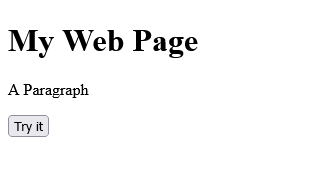
</html>Output should be:
Category: | Web Tutorial |
Sub Category: | HTML - The Head Element |
Uploaded by: | Admin |
Read Articlehttps://develop.horje.com/learn/1434/reference