
|
|
To set the width of a table, add the |
Example of HTML Table Width
 <table style="width:100%">
  <tr>
    <th>Firstname</th>
    <th>Lastname</th>
    <th>Age</th>
  </tr>
  <tr>
    <td>Jill</td>
    <td>Smith</td>
    <td>50</td>
  </tr>
  <tr>
    <td>Eve</td>
    <td>Jackson</td>
    <td>94</td>
  </tr>
</table>
Full Example of Example of HTML Table Width
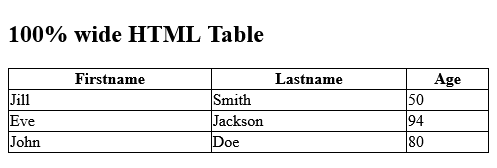
Set the width of the table to 100%:
index.html
Example:
HTML
<!DOCTYPE html>
<html>
<style>
table, th, td {
  border:1px solid black;
  border-collapse: collapse;
}
</style>

<body>

<h2>100% wide HTML Table</h2>

<table style="width:100%">
  <tr>
    <th>Firstname</th>
    <th>Lastname</th>
    <th>Age</th>
  </tr>
  <tr>
    <td>Jill</td>
    <td>Smith</td>
    <td>50</td>
  </tr>
  <tr>
    <td>Eve</td>
    <td>Jackson</td>
    <td>94</td>
  </tr>
  <tr>
    <td>John</td>
    <td>Doe</td>
    <td>80</td>
  </tr>
</table>

</body>
</html>Output should be:
Category: | Web Tutorial |
Sub Category: | HTML Table Sizes |
Uploaded by: | Admin |
Read Articlehttps://develop.horje.com/learn/1434/reference